
By Lee Wright CWNE, Redway Networks, WiFi Specialist - September 2025
Wi-Fi 7 brings exciting new features like Multi-Link Operation (MLO) and even faster data speeds.
But to take full advantage of these benefits, you need three things:
-
-
A WiFi 7 access point
-
A WiFi 7 client device
-
Compliance with Wi-Fi 7 security requirements defined by the Wi-Fi Alliance
-
If you are missing any of these, your Wi-Fi 7 network may downgrade to Wi-Fi 6 speeds. Before we delve into the rules of WiFi 7 Security, let’s first start by covering two key terms that we’ll be using throughout this article.
Authentication and Key Management (AKMs) and Cipher Suites
Authentication and Key Management (AKMs) are responsible for verifying users and enhancing encryption keys.
Cipher suites, on the other hand, take care of encrypting the data and ensuring its integrity.
A good way to understand their relationship is to imagine a safe with a combination lock:
Cipher suites encrypt data and ensure integrity, like the metal body of a safe protecting its contents.
Together, these two provide complete security. When we talk about WPA2 and WPA3, we’re really talking about a combination of an AKM and a cipher suite that works together to secure your Wi-Fi connection.
Enterprise WiFi Security
Let’s start by looking at enterprise modes of Wi-Fi Security.
For Wi-Fi 7, the Wi-Fi Alliance has introduced some important rules:
- AKM 1, one of the original AKM methods used with WPA2-Enterprise, is no longer allowed.
- GCMP-256 encryption is now mandatory for all Enterprise connections.
Although GCMP-256 isn’t new, it’s the first time it’s been required for this connection type. It offers two main advantages:
- Stronger security: Wi-Fi 7 moves from the 128-bit encryption used in CCMP to 256-bit encryption in GCMP.
- Increased efficiency: GCMP doesn't make the Wi-Fi data rate faster, but it does reduce computational overhead. This means less processing delay, especially in low-powered devices, meaning GCMP can outperform CCMP.
So, what does this all mean for network engineers configuring SSIDs?
- If your setup includes a Wi-Fi 7 access point and your SSID is configured to use WPA2-Enterprise, the connection will fall back to a Wi-Fi 6 level, and will be limited to the 2.4 GHz and 5 GHz frequencies.
- To unlock full Wi-Fi 7 speeds and access the 6 GHz band, you will need WPA3-Enterprise or WPA3-Enterprise Transition Mode. 6 GHz will only work with WPA3-Enterprise.
Personal WiFi Security
With Personal modes of operation, things get a bit more interesting. Wi-Fi 7 introduces two new AKMs:
- AKM 24: SAE (Simultaneous Authentication of Equals) with a group dependent hash.
- AKM 25: The same thing as AKM 24, but with Fast Transition (FT) support, which is part of 802.11r fast roaming.
The key difference between these new AKMs and the SAE ones is that the hash algorithm is no longer fixed at 256-bits. Instead it varies depending on the Diffie-Hellman (DH) group that is used.
For example if you use a Diffie-Hellman Group 21, your hash algorithm is increased to 512-bits. In addition, Hash-to-Element is enforced on all frequency bands, while previously, it was only enforced on the 6GHz band.
Just like enterprise modes of operation, the Wi-Fi Alliance set some constraints for Wi-Fi 7 devices using personal modes of operation.
- Any form of PSK AKMs, (WPA2-Personal) are no longer permitted.
- AKM 24 is now mandatory and the cipher suite, GCMP-256 is also required.
So what does this mean?
- If you have a Wi-Fi 7 capable access point or client device and your SSID is configured to use WPA2-Personal, you can expect your network to drop back to a Wi-Fi 6 connection and be limited to the 2.4 and 5GHz frequencies.
- To be able to unlock Wi-Fi 7 speeds and access 6 GHz bands, you’ll need to use WPA3-Personal or WPA3-Personal transition mode.
Open and Owe Security
With Open and OWE we have some interesting constraints,
- Legacy Open networks are unsurprisingly now forbidden as they have no encryption at all.
- OWE Transition mode is also forbidden.
- Like with other Wi-Fi 7 security modes, the GCMP-256 cipher is mandatory
This means that if your Wi-Fi 7 capable network is using Open or OWE Transition mode, you can expect it to drop back to Wi-Fi 6 speeds. Only when you use pure OWE, will you be able to unlock Wi-Fi 7.
AP Beacon Protection
One important feature we’ve yet to cover is AP Beacon Protection. This works by adding Message Integrity Code (MIC) to the beacon frame, which allows client devices to verify the integrity of the beacon, and ensure it’s safe to use. Some beacons could be forged or tampered with, making them a security risk.
AP Beacon Protection is mandatory for all Wi-Fi 7 connections, regardless of the security type.
Backward Compatibility
So far we’ve focused on Wi-Fi 7 clients connecting to it through access points. But as we all know, Wi-Fi 7 APs will have to service previous generations of Wi-Fi clients, which can create challenges.
The new AKMs are not backwards compatible, and not all legacy clients support GCMP-256 encryption.
But thankfully there is a simple solution where you can configure your SSID with multiple AKMs and multiple cipher suites. This approach ensures that both new Wi-Fi 7 devices and older clients can securely connect.
Real-world data
As part of this article, I recommend which AKMs and which cipher suites we should be using. To achieve this, I needed to gather real-world data, so I could understand what AKMs are currently in use and how Wi-Fi 7 Networks are being deployed today. So I took a trip into London, and I jumped on one of those open-top buses, and started capturing beacon frames.
I captured over 39000 unique BSSIDs of which just over 1000 were Wi-Fi 7. And to my surprise and disappointment, none of them met the requirements for Wi-Fi 7.
They were failing for different reasons with just over half of the SSIDs configured to use WPA2 or Open which is an immediate failure. Only one BSSID was using GCMP-256, and none of the Wi-Fi 7 SSIDs used AP beacon protection.
My initial reaction when I saw this was, does that mean none of these Wi-Fi 7 SSIDs will ever form a Wi-Fi 7 connection? But it turns out a Wi-Fi 7 connection can sometimes still be formed even if you don’t follow all the rules of Wi-Fi 7 security. Let me explain.

- The Wi-Fi Alliance forbids some security types, like Open and WPA2, for example. In most cases a Wi-Fi 7 connection won’t form if you’re using one of these forbidden types.
- On the other hand, there are mandatory security requirements, such as AKM24, GCMP-256 and Beacon Protection. However, as we’ve seen, many SSIDs in cities aren’t yet using these mandatory security types.
- But then you have this middle ground of AKMs and Cipher Suites that are neither forbidden, nor mandatory, essentially being optional. And it turns out a lot of the Wi-Fi 7 BSSIDs I found were using these optional AKMs and cipher suites. And it turns out some client devices will negotiate a WiFi 7 connection, if you’re using one of these optional security types.
I expect that we will see greater adoption of these mandatory security features, but in these early days of Wi-Fi 7, there seems to have been some hesitancy from vendors and administrators on enabling these new features. Like WPA3, I think we’ll slowly start to see greater adoption.
Looking at all the data collected, not just the WiFi 7 data. Here are the different AKMs I found:
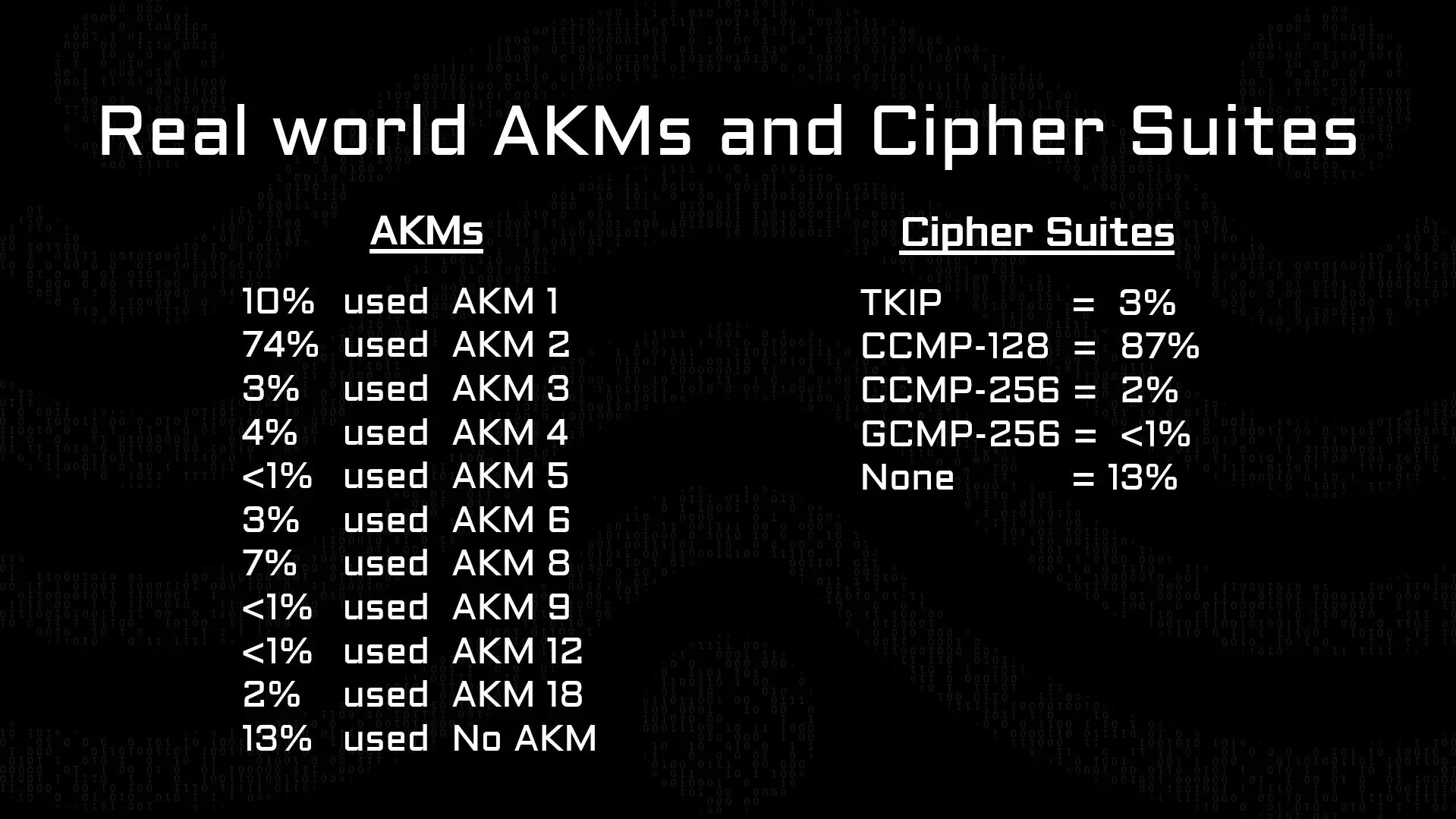
I won't dwell on this point too much, as there were no surprises.
- AKMs associated with WPA2 are still very popular, but AKMs associated with WPA3 are starting to gain some traction.
For cipher suites CCMP-128 is very popular, there were some SSIDs using CCMP-256, but I only ever saw this on Hidden SSIDs from Cisco Meraki, which I later discovered were used for mesh networking. I didn’t find any client facing SSIDs using CCMP-256.
MLO and Roaming Considerations AKM/Cipher Suite Cheat Sheets
Taking all of this real-world data and all of the guidance from the Wi-Fi Alliance, I’ve created an AKM Cipher Suite cheat sheet.How it works is you choose the type of SSID you’re configuring, for example WPA2/3 Personal Transition Mode. Below that, the cheat sheet shows the different AKMs and cipher suites different generations of client devices are likely to negotiate.
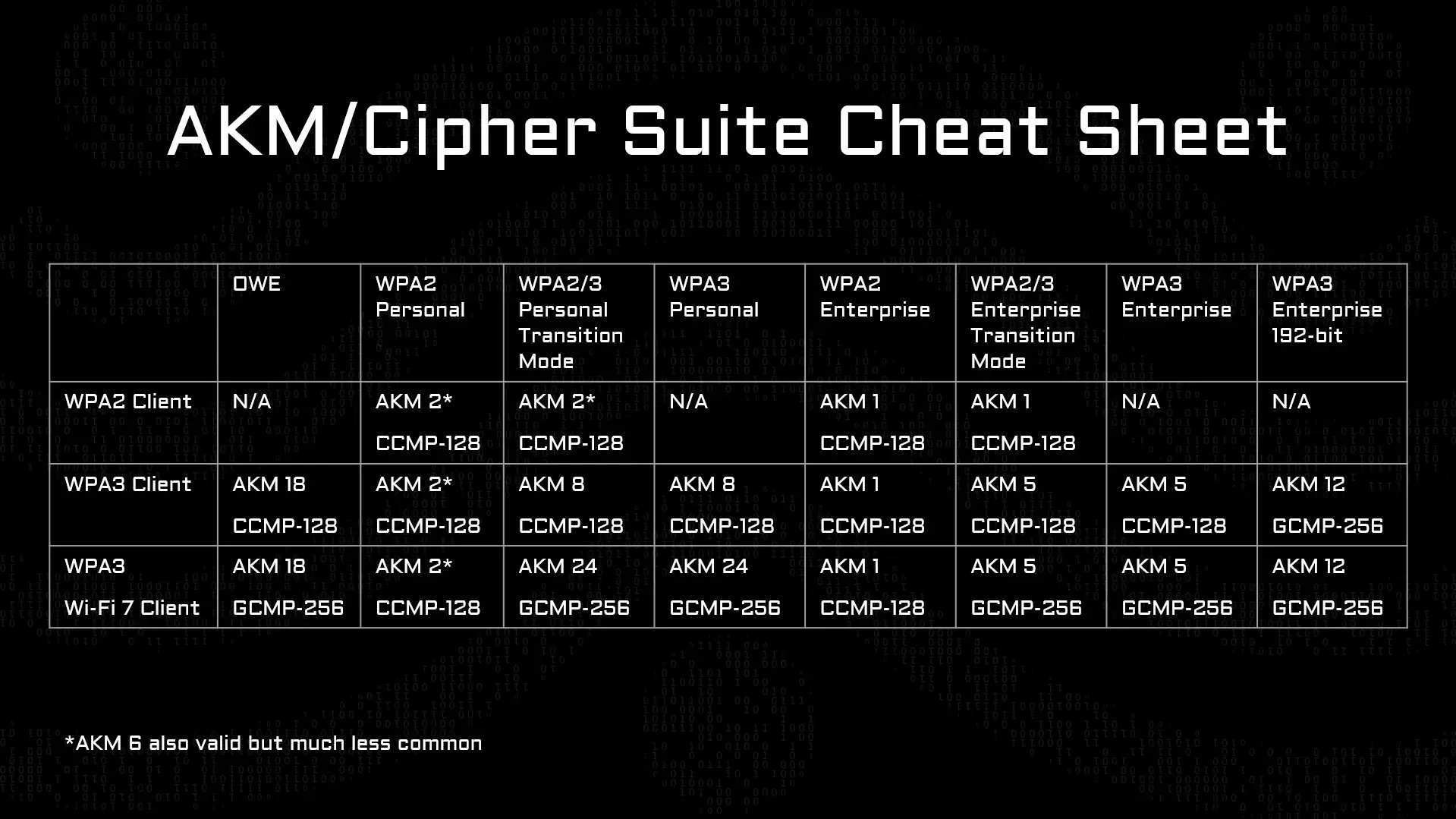
AKM 6 is also valid but much less common
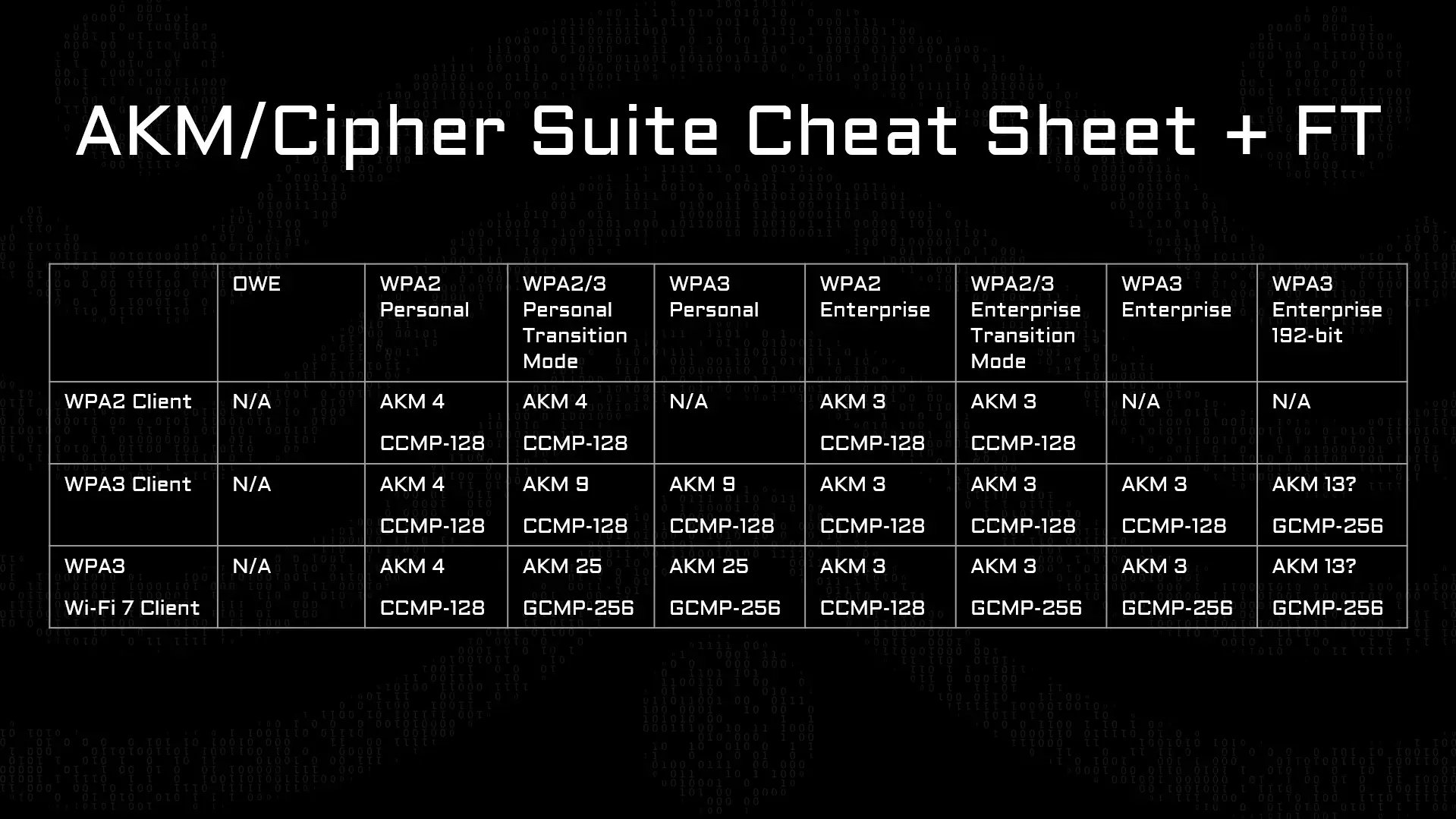
And if you’re using 802.11r fast roaming, you’ll need to use a different set of AKMs, which is listed here.
MLO and Roaming
Multi-Link Operation (MLO) has an interesting relationship with AKMs. For MLO to work, all frequency bands must use the same AKM.
Roaming also interacts closely with AKMs and cipher suites, specifically when you have a deployment of Wi-Fi 7 and non-WiFi 7 APs. In this scenario, you may find that your Wi-Fi 7 APs broadcast one set of AKMs and cipher suites that are different to the non-Wi-Fi 7 access points. Your Wi-Fi 7 client devices will connect using the best AKM and cipher suite. But when they want to connect to a different AP, they’re not able to continue using that AKM and cipher suite, forcing the client to disconnect and reconnect.
We have two ways to solve this problem:
- Reduce the capabilities of your Wi-Fi 7 APs so the AKMs and cipher suites match. While this solves the problem, it’s not the best option as it reduces the security and performance of your Wi-Fi 7 devices.
- A better option if your vendor supports it is to add these new AKMs and cipher suites to your non-Wi-Fi 7 APs. I’ve seen a few different vendors do this, and it preserves both security and performance so is the preferable option.
Validating AKMs and Cipher Suites
An important skill for engineers is the ability to validate which AKMs and cipher suites are currently in use.
Unfortunately, it’s not always clear from a GUI, but thankfully the packets don’t lie. By examining the beacon frame of an SSID, you can look under the RSN information tag to see the cipher suites and AKMs in use.
In this example, there's an SSID with 2 cipher suites, the first being GCMP-256, the second being CCMP-128, or AES CCM as it’s listed here in wireshark. This SSID also had two AKMs, AKM 8, note the 8 in brackets, that is the AKM number, and also AKM24, our new Wi-Fi 7 AKM.
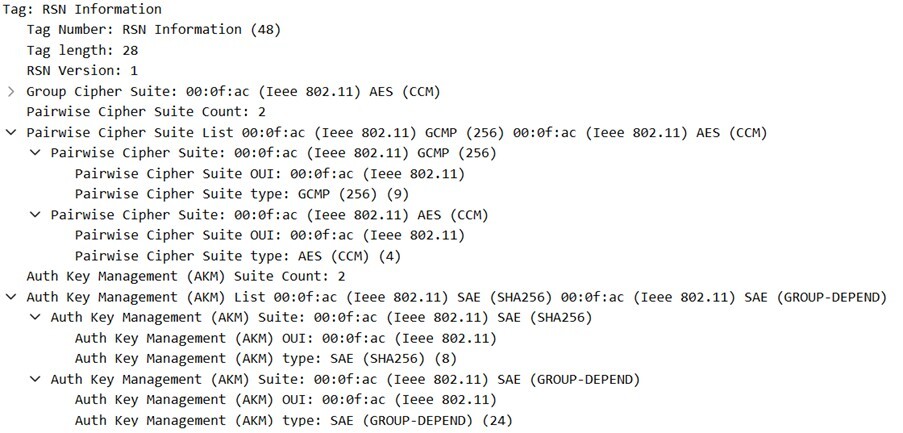
Being able to validate the AKMs and cipher suites in use on your network, not only ensures that you retain client compatibility, but also ensures that you’re getting the most out of your WiFi 7 devices as well.
Key takeaway:
Without WPA3, GCMP-256 encryption, and AP Beacon Protection, WiFi 7 networks cannot deliver their full performance and will fall back to WiFi 6 behaviour. Correct configuration, validation, and real-world testing are essential to ensure WiFi 7 deployments are secure, compatible, and future-proof.
How Redway Networks Can Help
Redway Networks has years of experience helping different industries improve their Wi-Fi networks. Our certified wireless experts know how to optimise performance and coverage so you get the best performance and reliability available.
Take the first step towards transforming your wireless network by exploring our wireless site surveys.
Or contact our expert team today on 01908 046400