

Why traditional guest WiFi doesn't work for schools - and what the alternatives are
Providing guest WiFi in a school sounds simple: a visitor arrives, connects to the internet, and gets on with their meeting or event. In practice, it's rarely that straightforward.
Today's schools support hundreds, sometimes thousands of connected devices belonging to students, staff, contractors and visitors. On top of that volume, IT teams must balance security, compliance, and ease of use with safeguarding. A basic "guest network" that just hands out internet access isn't enough to do that anymore.
.webp?width=1536&height=982&name=Guest%20WiFi%20(1).webp)
A well-designed guest access strategy should make life easier for visitors without adding to the IT team's workload or opening unnecessary security risks.
What is the best way to provide Guest WiFi in schools?
The best way to provide Guest Wi-Fi in schools is through cloud-managed guest access with sponsor approval and/or time-limited access. This removes shared passwords, improves safeguarding, reduces IT workload and ensures that unauthorised students can't gain access.
The problem with traditional guest WiFi
Many schools are still running guest networks that were set up years ago and never revisited.
Typically, these rely on:
-
A shared password that rarely changes
-
Little or no visibility over who's connected
-
Manual administration every time something needs updating
It looks simple on the surface, but it creates real problems beneath the surface.
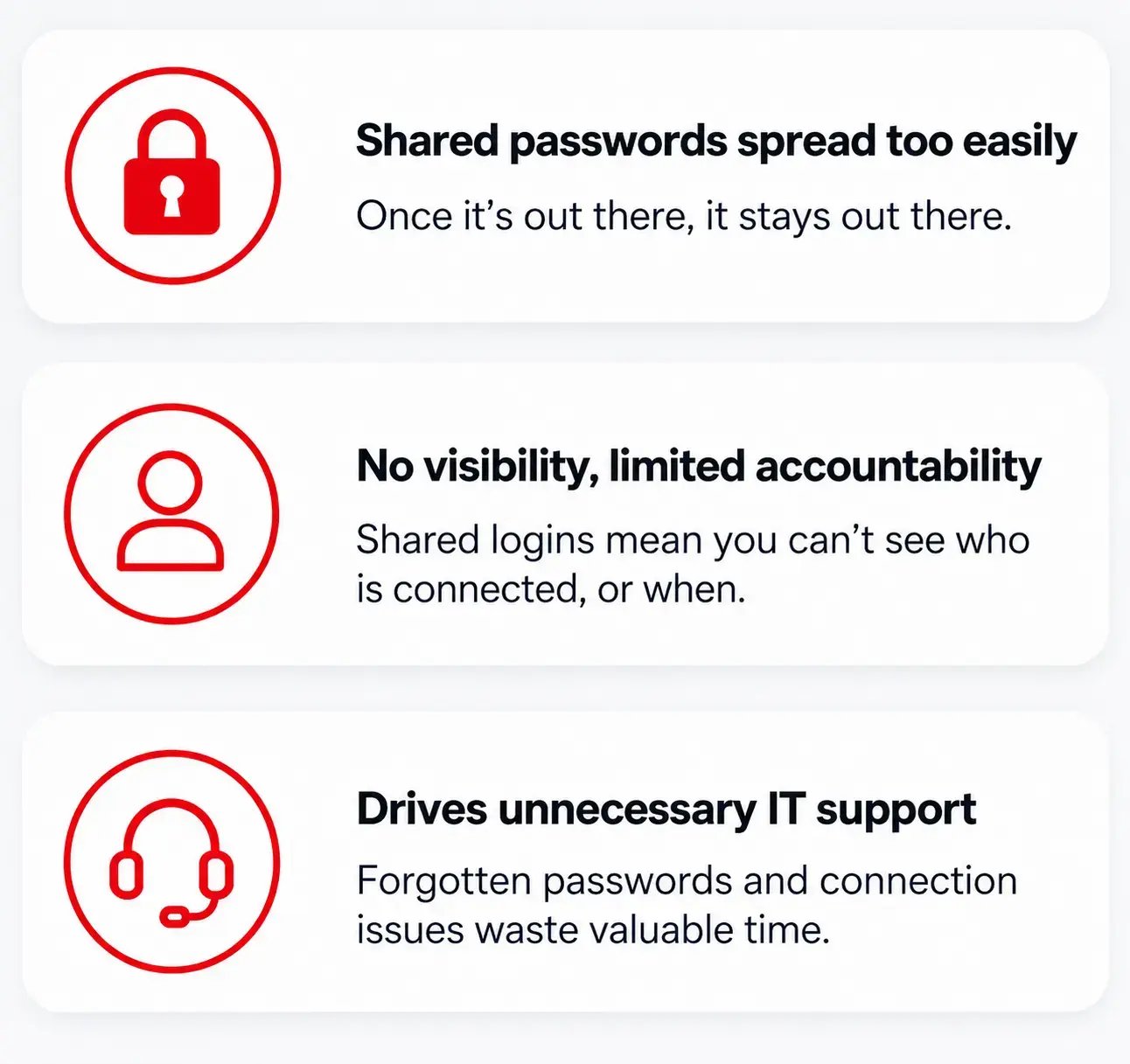
Passwords quickly become public.
Once a guest password has done the rounds among governors, contractors, parents, supply teachers and external organisations, it ceases to mean much. Changing it regularly is an administrative chore: leaving it unchanged means anyone who's ever known it could reconnect months or years later.
Shared credentials mean limited accountability.
If everyone uses the same guest login, there's no way to tell who was online in the event of a safeguarding or security incident. Schools increasingly need to know not just that someone is connected, but who, and when.
And it generates support requests IT teams don't have time for.
Forgotten passwords, typos, and visitors who need a hand connecting all add up to small interruptions that consume valuable IT time.
Why this matters-

A compromised guest network can lead to:
-
Unnecessary IT Support
-
Safeguarding concerns
-
Compliance risks
-
Slower wireless performance
-
Poor visitor experience
Schools have different requirements
Unlike a hotel or café, a school's visitor list is genuinely varied:
Governors, supply teachers, educational consultants, contractors, parents attending meetings, external training providers, examination invigilators, and local authority staff.
Each of these groups needs internet access, but not necessarily the same level of trust.
Some only need a couple of hours online; others may need access to specific internal resources for a longer period.
Handing everyone the same credentials rarely strikes the right balance between usability and security.
Modern alternatives to traditional guest WiFi/ Visitor WiFi in schools
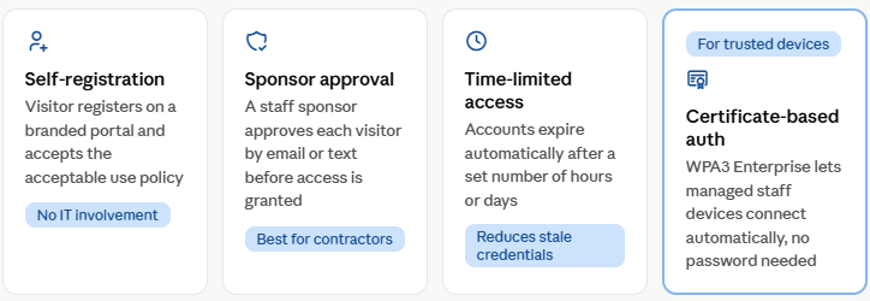
Enterprise wireless platforms offer far more flexible ways to manage guest access than a single shared password.
Self-registration portals
Let visitors connect to the network and register their own details on a branded login page, accepting the school's acceptable use policy in the process.
Access is granted automatically, without IT needing to get involved - smoother for the visitor, and better for accountability.
Sponsor approval
Suits higher-security environments. A visitor submits their details, a staff sponsor gets an email or text asking them to approve access, and once they do, access is granted for a defined period.
This works particularly well for contractors and external organisations that need a known staff member to vouch for them.
Time-limited access
Replaces permanent passwords with accounts that expire automatically after a set number of hours or days, cutting down the risk of old credentials still working long after they should have expired.
Certificate-based authentication
Is it the right fit for regular staff and managed devices rather than occasional visitors?
WPA3 Enterprise with certificate-based authentication provides staff devices with stronger security while simplifying the experience - authorised devices connect automatically, with no password to remember.
Cloud-managed wireless platforms have changed what's realistic for a school IT team to manage day to day.
Rather than manually creating accounts or handing out passwords, IT teams can:
• Create guest temporary access tokens ahead of time
• Monitor connected users in real time
• Apply different access policies automatically
• Review connection history whenever required
• Manage multiple schools from a central dashboard
For Multi-Academy Trusts, that means one consistent guest access strategy across the whole estate, with far less administrative overhead than managing each school separately. Read how we improved guest access at the John Warner School case study

Guest Wi-Fi should support safeguarding
Guest Wi-Fi isn't just a convenience feature - it's part of a school's safeguarding responsibilities. A properly designed network keeps guest users isolated from internal systems while still allowing the filtering, monitoring and logging that school policy requires. Get that right, and the network becomes safer for pupils, staff and visitors alike, not just easier to use.
A better experience for everyone
The best guest Wi-Fi for Schools is the kind nobody notices.
Visitors connect quickly, staff aren't pulled away to help with password resets, and IT teams maintain full visibility and control without lifting a finger for routine access.
The network stays secure, reliable and easy to manage in the background. That's the outcome every school should be aiming for.
Common mistakes
Four mistakes schools still make with Guest WiFi
• Using one shared password
• Never reviewing guest access policies
• Giving guests more access than necessary
• Relying on manual configuration
Avoid these common Guest WiFi mistakes
We've created a free School Guest WiFi Checklist to help schools quickly assess whether their current setup is secure, manageable, and suitable for visitors, contractors, governors, and other external users.
Download the checklist and review your setup
"The biggest mistake we see is schools relying on a guest password that hasn't changed for years. Modern guest access should be secure, simple and completely isolated from the production network."
Lee Wright, CCNP, CWNE 534
Planning a wider school network upgrade?
If your guest WiFi is only part of a wider connectivity issue, Redway Networks can also support schools with WiFi design, switching, cloud-managed networking, and infrastructure upgrades. Schools may also want to check whether they are eligible for the DfE Connect the Classroom scheme.
How Redway Networks can help
Redway Networks helps schools and Multi-Academy Trusts design secure, high-performance wireless networks that support modern teaching, learning and administration. Our certified wireless engineers can explain the available options, share what other schools have been doing, and help you determine a guest access strategy that best fits your environment.
Whether you're planning a full wireless refresh or simply want visitors to connect more smoothly, we can help you build a solution that balances security, usability and long-term scalability.
Is your school's Guest WiFi secure?
Redway Networks supports Multi-Academy Trusts across the UK. We still see many schools rely on shared passwords without realising the risks.
Book a professional Wi-Fi survey, and our certified wireless engineers will assess your guest access, security, coverage, and capacity, providing clear recommendations to improve performance and security.
Frequently Asked Questions
1. Why shouldn't schools simply share one guest WiFi password?
A shared password is hard to control once it's been passed around to visitors, contractors, and external organisations, and it makes it impossible to identify who was connected if a security or safeguarding issue arises. Modern guest access solutions offer far more visibility, security and accountability.
2. Should guest users have access to the school's internal network?
No. Guest users should have internet access only when there's a specific business need. A properly designed wireless network isolates guest traffic from school systems, protecting sensitive data and reducing risk.
3. How long should guest Wi-Fi access remain active?
It should generally be temporary. Many schools set accounts to expire automatically after a few hours or days, depending on the visitor, reducing the risk that old credentials remain usable long after they should have expired.
4. Can schools provide secure Wi-Fi access for contractors and supply teachers?
Yes - temporary accounts, sponsor approval and certificate-based authentication can all be used, depending on how often someone visits and what level of access they need.
5. Does guest Wi-Fi affect wireless performance?
It can, if the network hasn't been designed with it in mind. A properly designed wireless network ensures there's enough capacity for staff, students and guests together, while keeping unnecessary SSIDs and radio interference to a minimum.
6. How can Multi-Academy Trusts manage guest WiFi across multiple schools?
Cloud-managed networking platforms let Trust IT teams apply consistent guest access policies across every school from a single dashboard, simplifying administration while keeping security and visibility consistent across the estate.
7. How can Redway Networks help improve our school's guest WiFi?
Redway Networks designs secure, high-performance wireless networks for schools and Multi-Academy Trusts. We conduct professional Wi-Fi surveys, network audits, and wireless design using industry-leading tools, including Ekahau, helping schools deliver reliable guest access without compromising security or performance.
8. Can guests safely use the same WiFi as students?
Guests can safely use the same Wi-Fi as students only if the network utilises a properly configured Guest Network or a student BYOD network with client isolation. Otherwise, sharing the exact same internal network poses significant privacy and security risks.
9. Can Connect the Classroom funding help with guest WiFi?
The DfE Connect the Classroom scheme is focused on improving wireless and network infrastructure in eligible schools. While guest Wi-Fi may form part of a wider network design, schools should check their eligibility and project requirements before planning upgrades.
Key Takeaways
-
Traditional shared School guest WiFi passwords are hard to manage and offer limited security.
-
Modern guest access needs to balance ease of use with safeguarding, accountability and network security.
-
Self-service portals, sponsor approval and time-limited access all improve the visitor experience while reducing the load on IT teams.
-
Cloud-managed wireless platforms give schools greater visibility, centralised control and consistent policies across multiple sites.
-
A well-designed wireless network makes guest access complementary rather than compromising teaching, learning, and school operations.
Ready to Improve Your School's Guest Wi-Fi?
If your school or Multi-Academy Trust is still relying on shared guest passwords, or you simply want to modernise how visitors connect to your network, Redway Networks can help.
Our certified wireless engineers design secure, high-performance Wi-Fi networks that provide staff, students and guests reliable connectivity while supporting safeguarding, compliance and future growth.
From professional Wi-Fi surveys and network audits through to complete wireless design, deployment and ongoing support, we'll help you build a guest access strategy that's simple to manage and built to last.
Many schools still rely on shared passwords without realising the risks.
Book a professional Wi-Fi survey and our certified wireless engineers will assess your guest access, security, coverage and capacity, providing clear recommendations to improve performance and safeguarding. Contact our expert, friendly team today on 01908 046400

See how schools are modernising their WiFi
Delivered next-generation WiFi 7 and cloud-managed networking to improve coverage, performance and future scalability.
Upgraded legacy infrastructure with a resilient, future-ready wireless network designed to support modern teaching and learning.