
WiFi 7 is the latest generation of wireless networking technology, designed to deliver faster speeds, lower latency and greater reliability in demanding environments.
Building on WiFi 6 and WiFi 6E, WiFi 7 introduces technologies such as Multi-Link Operation (MLO), wider channels and improved spectrum efficiency. These advancements can help schools, businesses and warehouses support more connected devices and increasingly demanding applications.
But is WiFi 7 worth upgrading to, and what should organisations consider before investing?
In this guide, Redway Networks answers some of the most common questions about WiFi 7, its performance benefits and the practical considerations for deploying it successfully.
What is WiFi 7 and how does it work?
You may already be familiar with Wi-Fi 7, the latest Wi-Fi standard, also known as 802.11be. This standard uses the 2.4 GHz and 5 GHz frequency bands; WiFi 7 uses the same standard but extends the available frequencies to 6 GHz.
Those familiar with WiFi will know that 2.4GHz is very congested, with only three non-overlapping channels and non-WiFi devices all using the same frequency. 5GHz has more channels than 2.4Ghz and is considered less congested (though this congestion has been steadily increasing over the years), which is why most WiFi networks are designed for 5GHz today.
Ofcom has approved a portion of the 6GHz spectrum for Wi-Fi in the UK, giving us more channels than we’ve ever had before. Coupled with a thorough design, more channels mean less interference and channel overlap, resulting in more reliable networks with greater capacity. These extra channels also allow us to use wider channels to increase throughput. Let’s compare 2.4GHz, 5GHz and 6GHz in the UK:
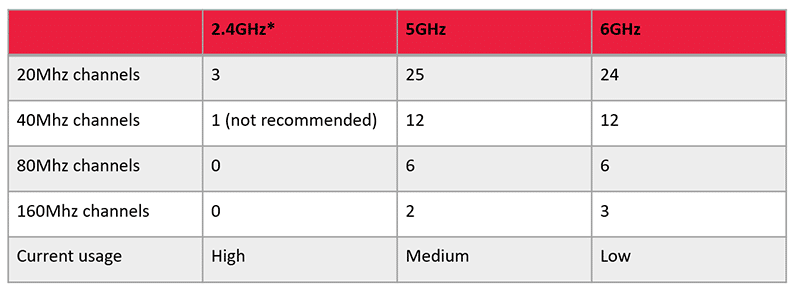
*channels are non-overlapping using 2.2Mhz channels.
Can businesses and schools use WiFi 7 now?
To use WiFi 7, you need three things: to be in a country that has enabled 6GHz (in the UK, 6GHz is allowed), a WiFi 7 Access point, and a WiFi 7 device (such as a laptop or smartphone).
WiFi 7 access points and devices have just started to enter the market. However, many new devices are still shipping without Wi-Fi 6E chipsets. Wifi 7 can operate using 2.4GHz and 5GHz without 6GHz support.
Most WiFi connections won’t be WiFi 7. However, we began to see the first WiFi 7 devices enter the market two years ago, and based on our analysis of UK networks, they now account for about 20% of connections. We may see a similar level of growth with WiFi 7.
A Wi-Fi 6E network deployed today will likely reap the benefits after the first few years.
What should you consider before deploying WiFi 7?
When deploying WiFi 7, there are a few considerations, and of course, each network will have its own specific requirements.
Depending on your use case, you may decide to deploy WiFi 7 in high-density or high-throughput areas. Another option is to include WiFi 7 in all locations.
One exciting option available with some access points is switching radios between 5GHz and 6GHz. For example, the XE3-4 Wi-Fi 6E Access Point from Cambium Networks allows you to combine two radios into a single 5GHz 6×6 device. Then, as more devices start to support WiFi 7, you can separate these radios into a 5GHz 2×2 and a 6GHz 4×4.
Another important topic to consider is WPA3. WPA3 enhances WiFi security and is mandatory for WiFi 7. As a result, WPA2 client devices won’t coexist with a Wi-Fi 6E SSID. This requirement introduces complexity for networks that support WPA2 devices, which are most networks today. A clear strategy should be developed for managing WPA2 and WPA3 connections on the same network.
6GHz radio waves will propagate differently from 5 GHz radio waves. The higher the frequency, the greater the loss between free space and physical objects, resulting in smaller coverage cells for Wi-Fi 6E devices. So it is essential to plan for coverage of your new WiFi 7 network and, where necessary, adjust AP placement and quantity.
What is the difference between WiFi 6, WiFi 6E and WiFi 7?
WiFi 6, WiFi 6E, and WiFi 7 are different generations of wireless technology, each offering improvements in speed, capacity and performance. Wi-Fi 6 operates on the 2.4 GHz and 5 GHz frequency bands, providing improved efficiency and performance in environments with multiple connected devices. Wi-Fi 6E builds on Wi-Fi 6 by introducing the 6 GHz frequency band, offering additional channels, reduced interference, and improved connectivity in busy wireless environments.
Wi-Fi 7 takes wireless performance further with higher potential speeds, lower latency, and improved reliability. New features such as Multi-Link Operation (MLO) allow compatible devices to use multiple wireless links, helping improve performance and connection stability.
Is upgrading to WiFi 7 worth it for schools and businesses?
Upgrading to WiFi 7 can be worthwhile for schools and businesses that need faster, more reliable wireless connectivity, particularly in environments with many connected devices. For schools, WiFi 7 can support high-density classrooms, cloud-based learning applications, video conferencing, and an increasing number of connected devices.
For businesses, it can offer improved capacity, lower latency and more consistent performance for bandwidth-intensive applications and busy office environments.
Before investing in WiFi 7, it's important to assess your existing network, device compatibility, coverage requirements and future connectivity issues. A professional WiFi site survey can help determine whether upgrading to WiFi 7 will deliver measurable benefits for your organisation.
If you’re considering using Wi-Fi 6E in your network and want to discuss your deployment strategy, you can contact our Wi-Fi specialists on 01908 046 400.